Outreach Email Classification Automation
Shipped Jan 2026
Every reply to an outreach campaign had to be opened and read by hand just to tell an interested prospect apart from a bounce, an out-of-office reply, or an unsubscribe request. An earlier version of the pipeline relied on n8n's native Gmail Trigger to poll the inbox directly, but that left no granular control over which replies counted as valid outreach and no way to throttle delivery to the AI classification step at a safe pace.
Built With
 n8n
n8n  Google Apps Script
  Gmail
Gmail  Google Sheets
  Gemini AI
  Slack
Slack Project Overview
Every reply to an outreach campaign had to be opened and read by hand just to tell an interested prospect apart from a bounce, an out-of-office reply, or an unsubscribe request. An earlier version of the pipeline relied on n8n's native Gmail Trigger to poll the inbox directly, but that left no granular control over which replies counted as valid outreach and no way to throttle delivery to the AI classification step at a safe pace.
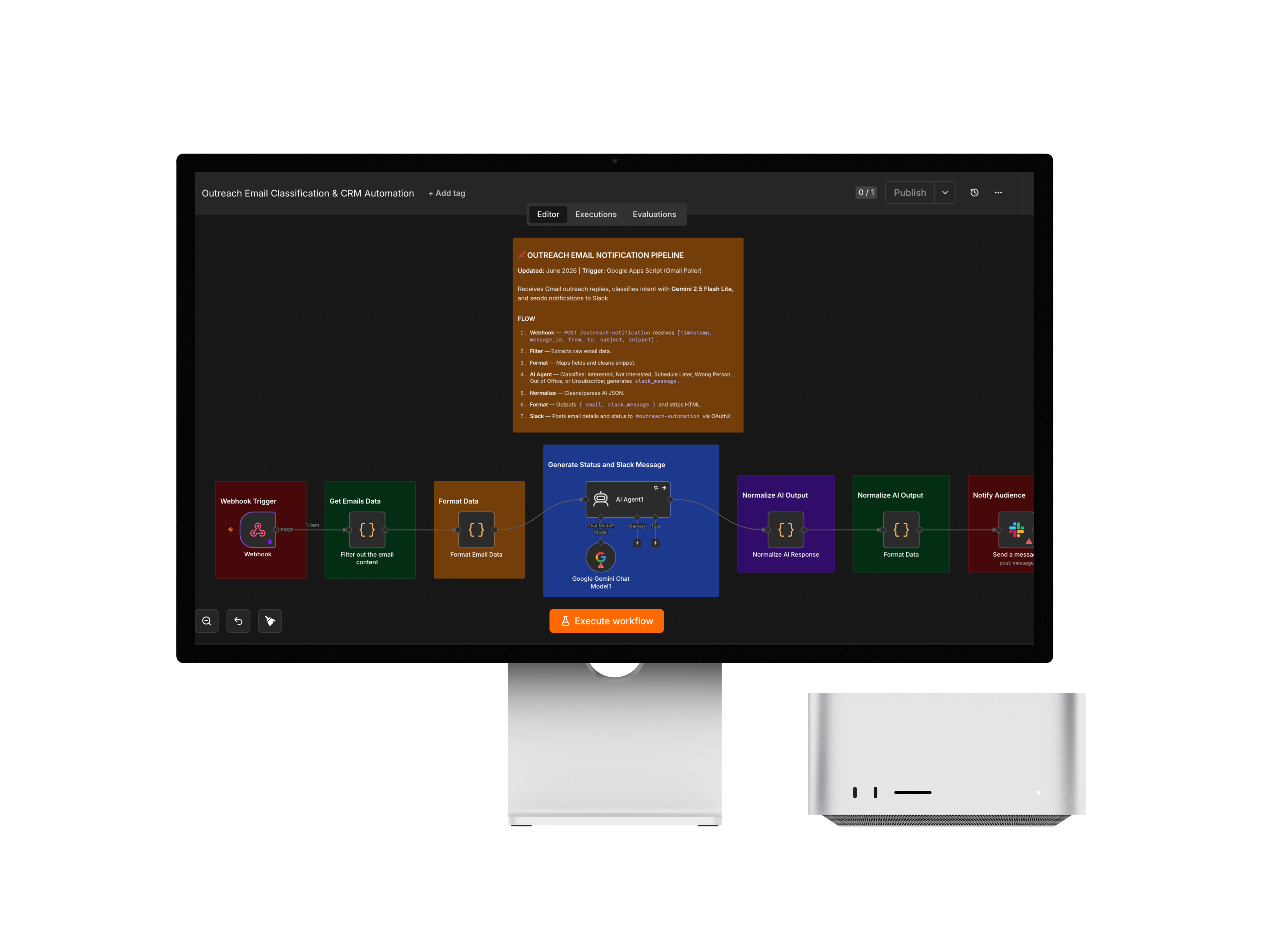
Inbox polling now lives outside n8n entirely, in a Google Apps Script bound to a Google Sheet: a 1-minute trigger scans Gmail, filters replies against spreadsheet-editable allowed-recipient, blocked-domain/sender, and keyword rules, and queues qualifying replies to an n8n webhook at a rate-limited 6-per-minute pace tuned to Gemini's limits, with state persisted across runs so nothing is double-processed or dropped. n8n classifies each reply's intent with Gemini 2.5 Flash Lite — Interested, Not Interested, Schedule Later, Wrong Person, Out of Office, or Unsubscribe — and posts a formatted status notification straight to a dedicated Slack channel.
A dedicated normalization step guards against malformed AI JSON output, failed webhook deliveries get automatically re-queued instead of lost, and both the filtering rules and the AI's classification behavior are tunable directly from a spreadsheet and a prompt — so the pipeline stays reliable and adjustable without a redeploy.
- Challenge
- Every reply to an outreach campaign had to be opened and read by hand just to tell a genuinely interested prospect apart from a bounce, an out-of-office reply, or an unsubscribe request, delaying follow-up on the replies that actually mattered. An earlier version of the pipeline used n8n's built-in Gmail Trigger to poll the inbox directly, but that gave no granular control over what counted as a valid outreach reply — no recipient allow-list, blocked-domain/sender filtering, or warm-up/unsubscribe keyword detection — and no way to throttle delivery to the AI classification step at a safe, sub-rate-limit pace, risking delayed or dropped notifications whenever replies arrived in a burst. On top of that, classification rules and the AI's own behavior both needed regular tuning as new outreach patterns appeared, an unhandled AI JSON-parsing failure could silently corrupt a Slack notification with no clear cause, and a failed webhook delivery risked losing a genuine reply outright.
- Solution
- Moved inbox polling out of n8n entirely and into a Google Apps Script bound to a Google Sheet: a time-based trigger scans the Gmail inbox every minute, filters incoming mail against configurable allowed-recipient, blocked-domain/sender, and warm-up/unsubscribe keyword rules read straight from Sheet tabs, and queues qualifying replies to an n8n webhook at a strict 6-per-minute, 35-second-gap pace calibrated to Gemini's rate limits — with LAST_RUN_TIMESTAMP, PENDING_QUEUE, and PROCESSED_IDS persisted in script properties so polling stays stateful across every run. n8n receives each reply over webhook, unwraps and formats it, and passes it to an AI Agent running Gemini 2.5 Flash Lite (with retryOnFail set to automatically handle any 429 response) that classifies it as Interested, Not Interested, Schedule Later, Wrong Person, Out of Office, or Unsubscribe and drafts a status summary; classification behavior itself lives entirely in the agent's system prompt, so tuning it means editing the prompt, not the workflow. A dedicated Normalize code node strips any accidental ```json``` wrapping and explicitly throws on a parsing failure so it surfaces in n8n's execution logs instead of producing a malformed Slack message, and the Apps Script poller re-queues any email whose webhook delivery failed so it's retried on the next run rather than lost. The formatted result — status, timestamp, sender, recipient, subject, and snippet — posts to a dedicated #outreach-automation Slack channel over OAuth2. The same n8n canvas still holds the earlier, now-deactivated Gmail Trigger approach it replaced, left in place rather than deleted.
- Impact
- Replaced manual inbox triage with automatic, rate-safe classification and instant Slack visibility the moment a reply lands, rather than after someone works through the inbox by hand. Filtering rules and classification accuracy are both tunable in minutes — by editing a spreadsheet tab or the AI agent's prompt — without a developer touching workflow code, and rate-limit protection plus webhook re-queuing mean classification keeps working reliably even during reply bursts or transient delivery failures.
Frequently Asked Questions
Every reply to an outreach campaign had to be opened and read by hand just to tell an interested prospect apart from a bounce, an out-of-office, or an unsubscribe request — and n8n's native Gmail Trigger gave no way to filter or rate-limit what reached AI classification.
Outreach Email Classification Automation was built with n8n, Google Apps Script, Gmail, Google Sheets, Gemini AI, Slack.
This was built as commercial/client work, so the source code isn't publicly available. Get in touch to discuss the implementation.
AI-powered email reply classification uses a large language model to read the content of a cold-outreach reply and automatically categorize its intent — such as Interested, Not Interested, Schedule Later, Wrong Person, Out of Office, or Unsubscribe — removing the need for a human to manually read and triage every incoming reply.
A Google Apps Script bound to a Google Sheet can apply custom, spreadsheet-editable filtering rules — allowed recipients, blocked domains and senders, warm-up and unsubscribe keyword detection — and throttle outbound delivery to a downstream API at a precisely controlled rate, giving finer-grained, more easily tunable control than relying solely on a workflow engine's built-in polling trigger.
Rate-limit avoidance combines proactive throttling — sending requests at a deliberately slow, controlled pace, such as a fixed number per minute with a delay between each — with reactive handling, like automatically retrying a request when the API returns a 429 rate-limited response, so bursts of incoming replies don't overwhelm the AI provider's limits.
Large language models sometimes wrap structured JSON output in markdown code fences or format it inconsistently, so a parsing step needs to strip that formatting and explicitly throw a visible error on failure — rather than silently passing malformed or partial data further down the pipeline, which would otherwise produce a confusing, malformed notification with no clear root cause.
A prompt-driven classification system means the AI model's system prompt — not surrounding code — defines how inputs are categorized, so fixing a misclassification issue means editing the prompt's instructions rather than modifying the workflow's code nodes, making behavioral tuning faster and more accessible to non-developers.
A resilient webhook-based automation has the sending side — here, the Google Apps Script poller — detect failed delivery attempts and re-queue that item for the next scheduled run rather than discarding it, combined with persistent state tracking (a processed-IDs list and a pending queue) so retries don't create duplicate notifications.
Sending AI-classified outreach replies to a dedicated Slack channel gives a sales or outreach team near-real-time, at-a-glance visibility into new reply intents as they're classified, integrating directly into a tool the team already actively monitors rather than requiring them to check a separate dashboard or inbox.
Storing filter criteria — blocked domains, blocked senders, keyword lists — in Google Sheet tabs lets non-developers update outreach-filtering rules by editing a spreadsheet directly, instead of requiring a workflow or code change and redeployment for every new domain, sender, or keyword that needs to be added or removed.
Available for work
Got a project like this
in mind?
Let's talk about what you're building and how I can help ship it.