Zendesk AI Support Automation
Shipped Sep – Oct 2025
A support team's agents were spending time piecing together context by hand before every reply — reading through screenshots and PDF attachments on a new ticket, listening back through an Aircall call recording, or re-reading a long thread to draft the next response. None of that AI-assisted work was logged anywhere central, and nothing stopped the same trigger event from generating the same response twice.
Built With
 n8n
n8n  Zendesk
  Google Vision AI
  GPT-4o
  ElevenLabs
  Aircall
  Microsoft SQL Server
  Google Cloud Storage
 Project Overview
A support team's agents were spending time piecing together context by hand before every reply — reading through screenshots and PDF attachments on a new ticket, listening back through an Aircall call recording, or re-reading a long thread to draft the next response. None of that AI-assisted work was logged anywhere central, and nothing stopped the same trigger event from generating the same response twice.
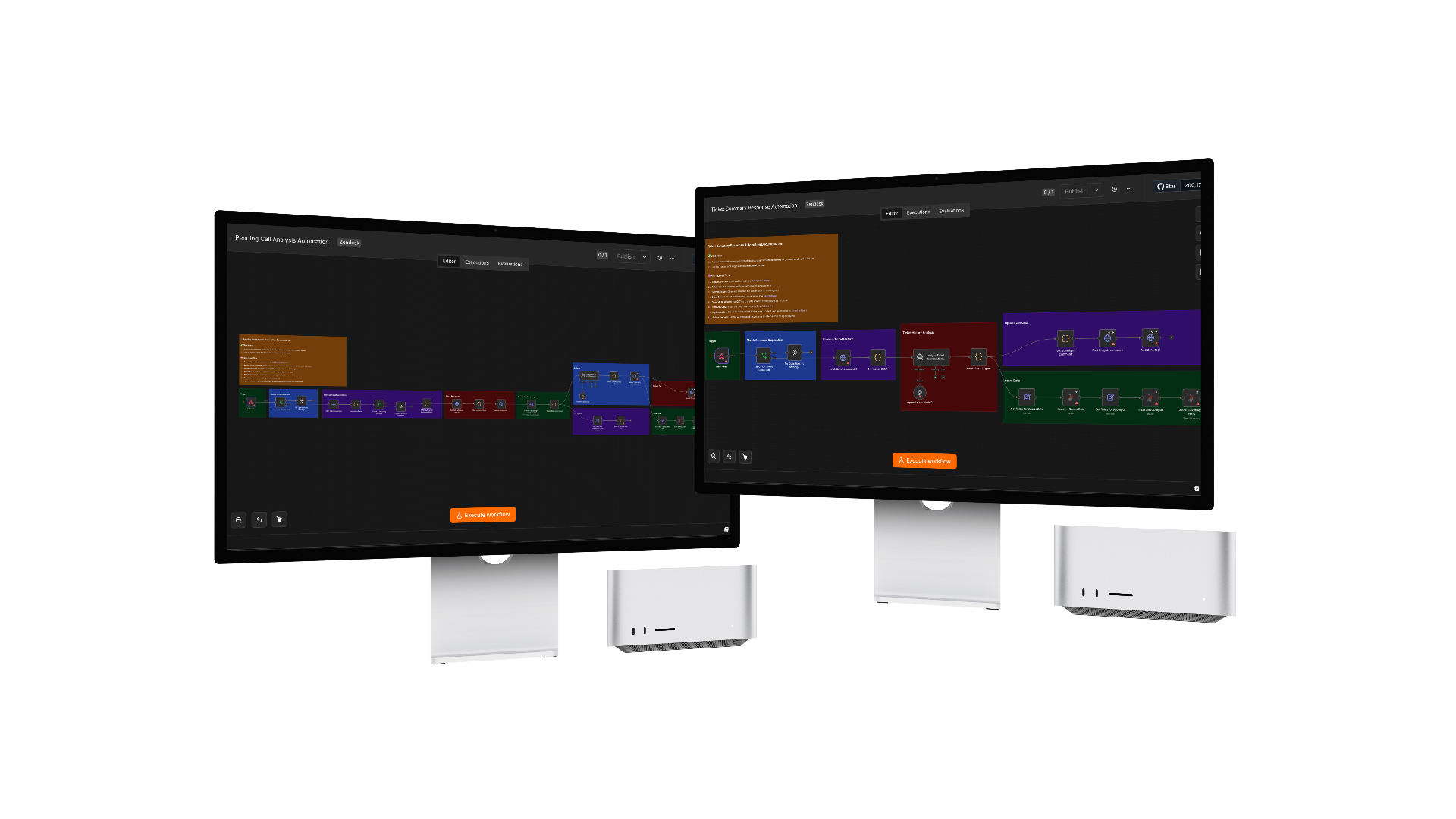
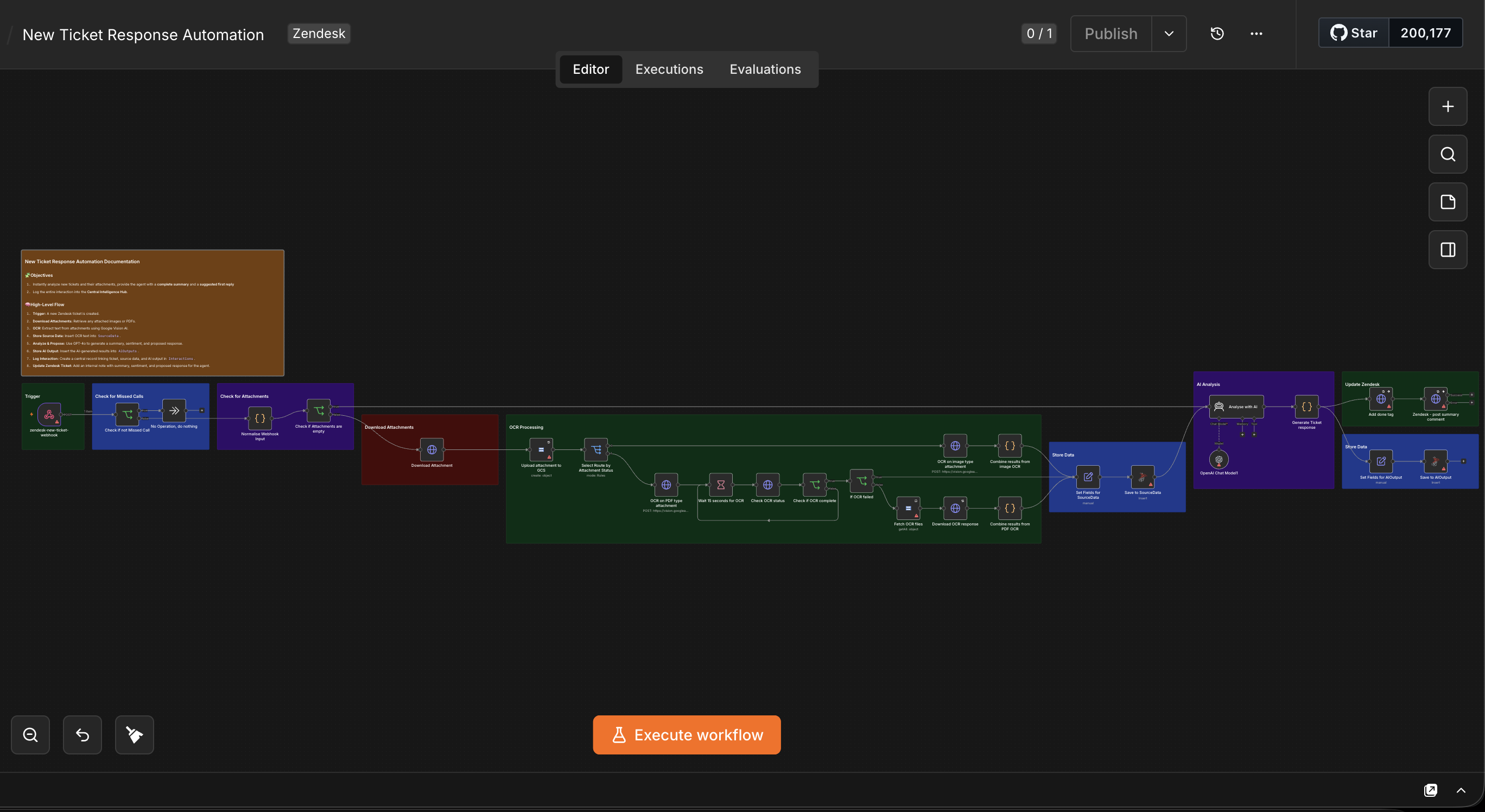
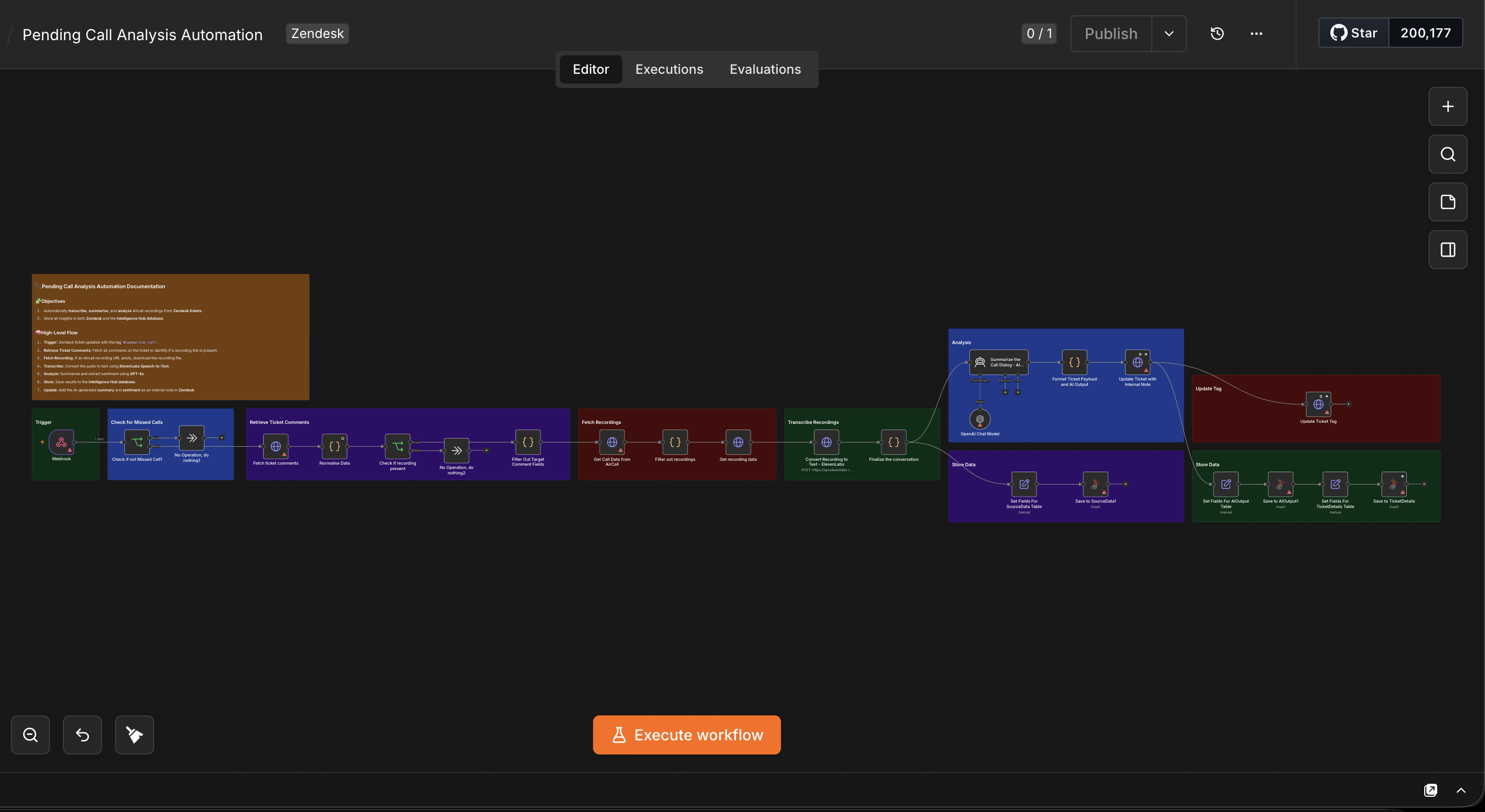
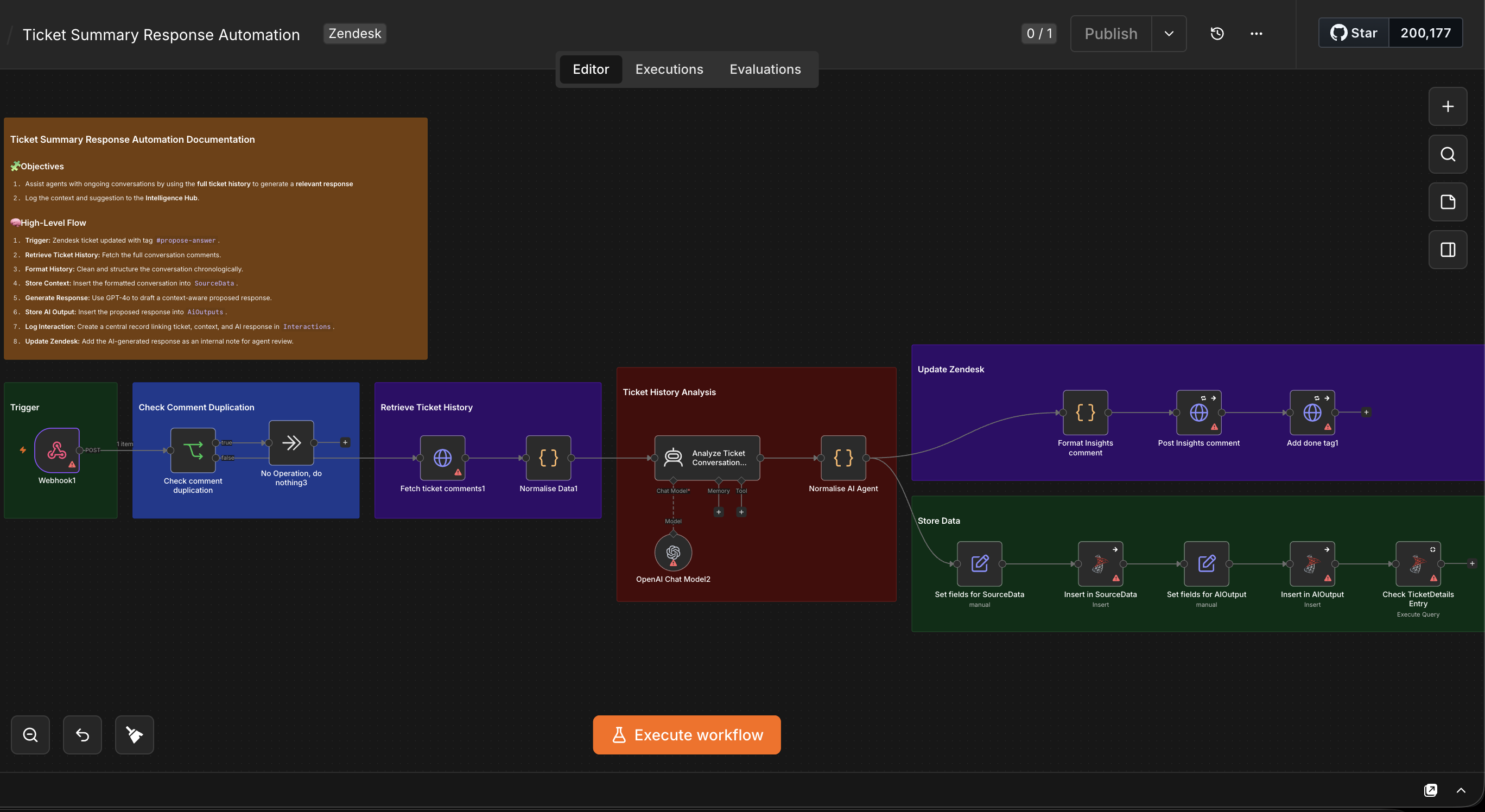
Three linked n8n workflows now handle each case directly from Zendesk. New Ticket Response Automation uploads new-ticket attachments to Google Cloud Storage and OCRs them with Google Vision AI — polling the asynchronous job to completion on separate image and PDF paths — before GPT-4o drafts a summary, sentiment, and proposed reply. Pending Call Analysis Automation filters out missed calls, transcribes real Aircall recordings with ElevenLabs, and has GPT-4o summarize the call and its sentiment. Ticket Summary Response Automation drafts a context-aware reply from the full conversation history, gated by a duplication check so the same AI comment can't post twice.
All three post their output straight back to Zendesk as an internal note for the agent to review — never directly to the customer — and tag the ticket on completion to block reprocessing. And all three log through the same SourceData, AiOutputs, and Interactions tables in a Microsoft SQL Server–backed Central Intelligence Hub, giving the team one queryable audit trail of every AI summary and proposed response instead of three disconnected automations with no shared record.
- Challenge
- A support team's agents were spending time piecing together context by hand before they could reply to a ticket: reading through screenshots and PDF attachments on a new ticket, listening back through an Aircall recording to find out what was actually discussed, or re-reading a long conversation thread to draft the next reply. None of that AI-assisted work was logged anywhere central, so there was no shared record of what had already been summarized or proposed for a given ticket — and nothing stopped the same trigger, like a retried webhook or a re-added tag, from generating the same AI response twice.
- Solution
- Built three linked n8n workflows, each triggered directly from Zendesk. New Ticket Response Automation fires when a ticket is created: it normalizes the incoming webhook payload, checks for attachments, and — if any exist — uploads them to Google Cloud Storage and routes them through Google Vision AI OCR on separate paths for images vs. PDFs, polling ("Wait 15 seconds for OCR" → check OCR status → check if complete) until the asynchronous job finishes. The OCR text plus the ticket body feed a GPT-4o agent that drafts a summary, sentiment read, and proposed first reply, posted back as an internal note with a "done" tag to block reprocessing. Pending Call Analysis Automation fires when a ticket is tagged #summarize-call: it locates the Aircall recording link in the ticket's comments, filters out missed calls with no actual recording, downloads the audio, transcribes it with ElevenLabs Speech-to-Text, and has GPT-4o summarize the call and its sentiment before posting both as an internal note and updating the ticket's tag. Ticket Summary Response Automation fires when a ticket is tagged #propose-answer: it pulls the full comment history, formats it chronologically, checks the SQL database for an existing TicketDetails record, and has GPT-4o draft a context-aware proposed response — gated by a comment-duplication check before posting, so the same AI reply can't land twice. All three write through the same SourceData → AiOutputs → Interactions tables in a Microsoft SQL Server–backed Central Intelligence Hub, so every ticket, call, and conversation the AI has touched is logged in one place.
- Impact
- Every new ticket, pending call, and ongoing conversation now gets an instant AI-drafted summary and reply logged straight into Zendesk as an internal note, before an agent even opens it — replacing the manual read-transcribe-and-draft work that used to precede every reply, while keeping a human agent as the final gate before anything reaches a customer. Duplicate-prevention checks and completion tagging on every workflow mean agents see one clean AI note per event instead of a ticket cluttered with repeated or conflicting responses, and because all three workflows log through the same Central Intelligence Hub tables, the team gets a single, queryable audit trail of every AI summary and proposed response across tickets, calls, and conversations — not three disconnected automations with no shared record.
Frequently Asked Questions
Support agents had to manually gather context before every reply — reading ticket attachments, listening back through call recordings, or re-reading long conversation threads — with no AI assistance and no shared record of what had already been summarized or proposed for a given ticket.
Zendesk AI Support Automation was built with n8n, Zendesk, Google Vision AI, GPT-4o, ElevenLabs, Aircall, Microsoft SQL Server, Google Cloud Storage.
This was built as commercial/client work, so the source code isn't publicly available. Get in touch to discuss the implementation.
An AI-powered support ticket triage automation automatically reads a new customer support ticket — including its text, any attachments, or a linked call recording — and generates a summary, sentiment assessment, and a suggested first reply for a human agent to review, typically posting that output as an internal note rather than sending it directly to the customer.
OCR (Optical Character Recognition), such as Google Vision AI, extracts machine-readable text from image or PDF attachments a customer submits — like a screenshot of an error message or a scanned invoice — so that text can be included in the context an AI model uses to summarize the ticket and draft a response, rather than the AI being blind to what the attachment actually contains.
A recorded call — for example, from a phone system like Aircall — can be downloaded, converted to text with a speech-to-text service such as ElevenLabs, and passed to a large language model like GPT-4o to generate a written summary and sentiment analysis, turning an audio recording into structured, searchable text without manual transcription.
Posting AI-drafted responses as internal, agent-only notes keeps a human reviewer in the loop before any AI-generated content reaches a customer, protecting against inaccurate, incomplete, or wrongly-toned responses that a fully automated reply system could otherwise send without review.
A central intelligence hub is a shared database — here, Microsoft SQL Server — that every AI-support-automation workflow writes to, typically separating raw input data, AI-generated output, and a linking record per interaction, so support data from different triggers (new tickets, ongoing conversations, call recordings) can be queried and analyzed together instead of staying siloed inside individual ticket records.
A duplication-prevention check confirms whether a matching AI-generated comment already exists on a ticket before posting a new one, and a completion tag is applied once processing finishes so the same trigger event isn't reprocessed if it fires again — for example, from a webhook retry or a re-applied tag.
Ticket-level analysis runs when a new ticket is first created, evaluating the initial message and any attachments. Conversation-level analysis runs on demand — typically triggered by an agent adding a specific tag — and analyzes the full back-and-forth history to draft a context-aware reply. Call-level analysis is triggered separately to transcribe and summarize a linked phone call recording. Each addresses a different moment in the support lifecycle, rather than one generic "analyze this ticket" step.
OCR on documents like PDFs is often processed asynchronously by the provider, so the extracted text isn't available the instant the job is submitted — a workflow needs to wait a set interval, check the job's status, and repeat if necessary before it can safely combine and use the OCR results, rather than assuming the text is ready immediately.
Available for work
Got a project like this
in mind?
Let's talk about what you're building and how I can help ship it.