Social Media Posting Automation
Shipped Nov – Dec 2025
A client needed a steady posting cadence across six social platforms — YouTube, Facebook, Instagram, LinkedIn, Threads, and TikTok — that could take a raw video and brief all the way to a live, scheduled post without a person hand-writing captions, babysitting OAuth tokens, or finding out about a failed upload after the fact.
Built With
 n8n
n8n  Google Cloud Functions
  Google Apps Script
  Google Forms
  Google Drive
  Google Sheets
  Google Calendar
  Gmail
Gmail  OpenAI
  TikTok API
  LinkedIn API
  Meta Graph API
  YouTube Data API
 Project Overview
A client needed a steady posting cadence across six social platforms — YouTube, Facebook, Instagram, LinkedIn, Threads, and TikTok — that could take a raw video and brief all the way to a live, scheduled post without a person hand-writing captions, babysitting OAuth tokens, or finding out about a failed upload after the fact.
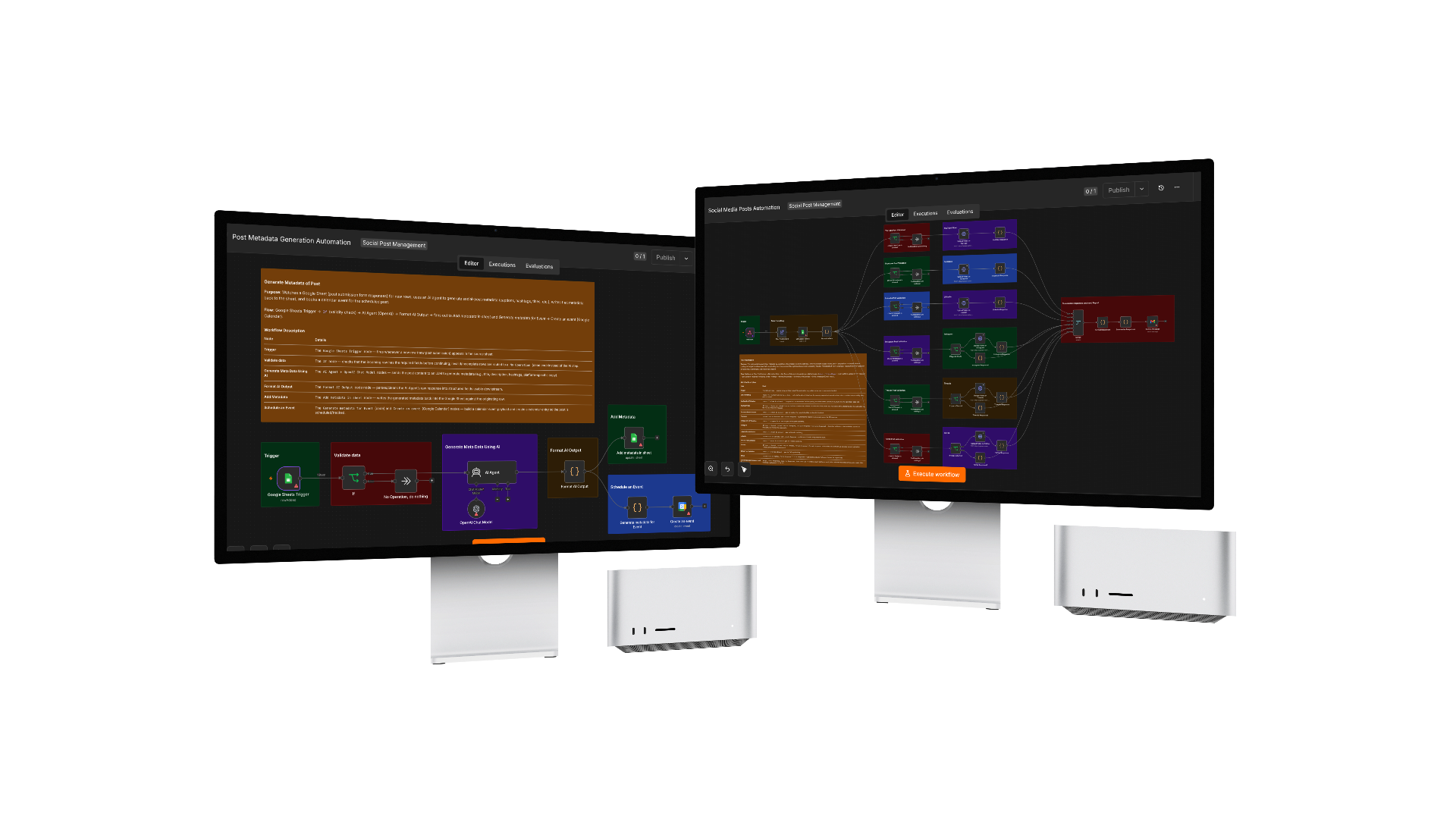
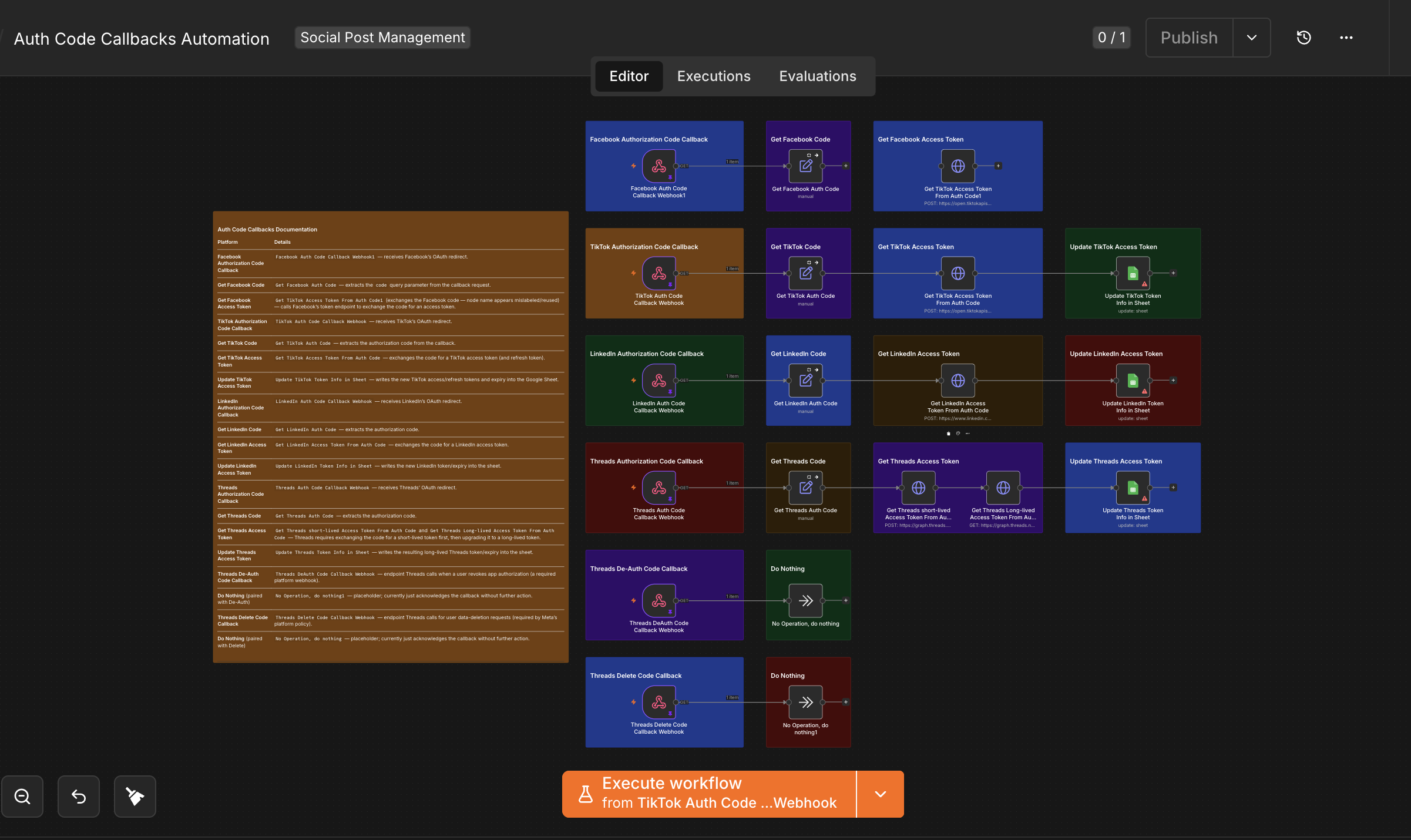
The system runs on four layers: Google Forms and Drive for client intake, Google Sheets as the system of record and human-approval queue, five linked n8n workflows for orchestration (metadata generation, scheduling handoff, publishing, token refresh, and OAuth callbacks), and Google Cloud Functions carrying each platform’s own upload logic so n8n never has to speak YouTube’s, TikTok’s, or Meta’s APIs directly. A Google Apps Script trigger scans the sheet every minute for approved, due posts and fires the publish workflow by webhook — giving minute-precision scheduling without standing up a dedicated job queue.
Every publish is gated per platform and per content type, Threads’ extra deauthorization/data-deletion and token-exchange requirements are handled inside the same stack, and a centralized error logger plus a per-run summary email mean the team hears about a problem from an alert — not a missing post.
- Challenge
- A client needed a steady posting cadence across six social platforms — YouTube, Facebook, Instagram, LinkedIn, Threads, and TikTok — that could take a raw video and campaign brief all the way to a live, scheduled post without a person writing six sets of platform-specific captions by hand, tracking which of six OAuth tokens was about to expire, publishing AI-drafted copy with no review checkpoint, or discovering a failed upload only when someone happened to check. Threads added its own compliance burden on top — Meta requires dedicated deauthorization and data-deletion callback endpoints plus an extra short-lived-to-long-lived token exchange that no other platform needs — and with six independent API calls firing per post, a partial failure on just one platform could easily go unnoticed.
- Solution
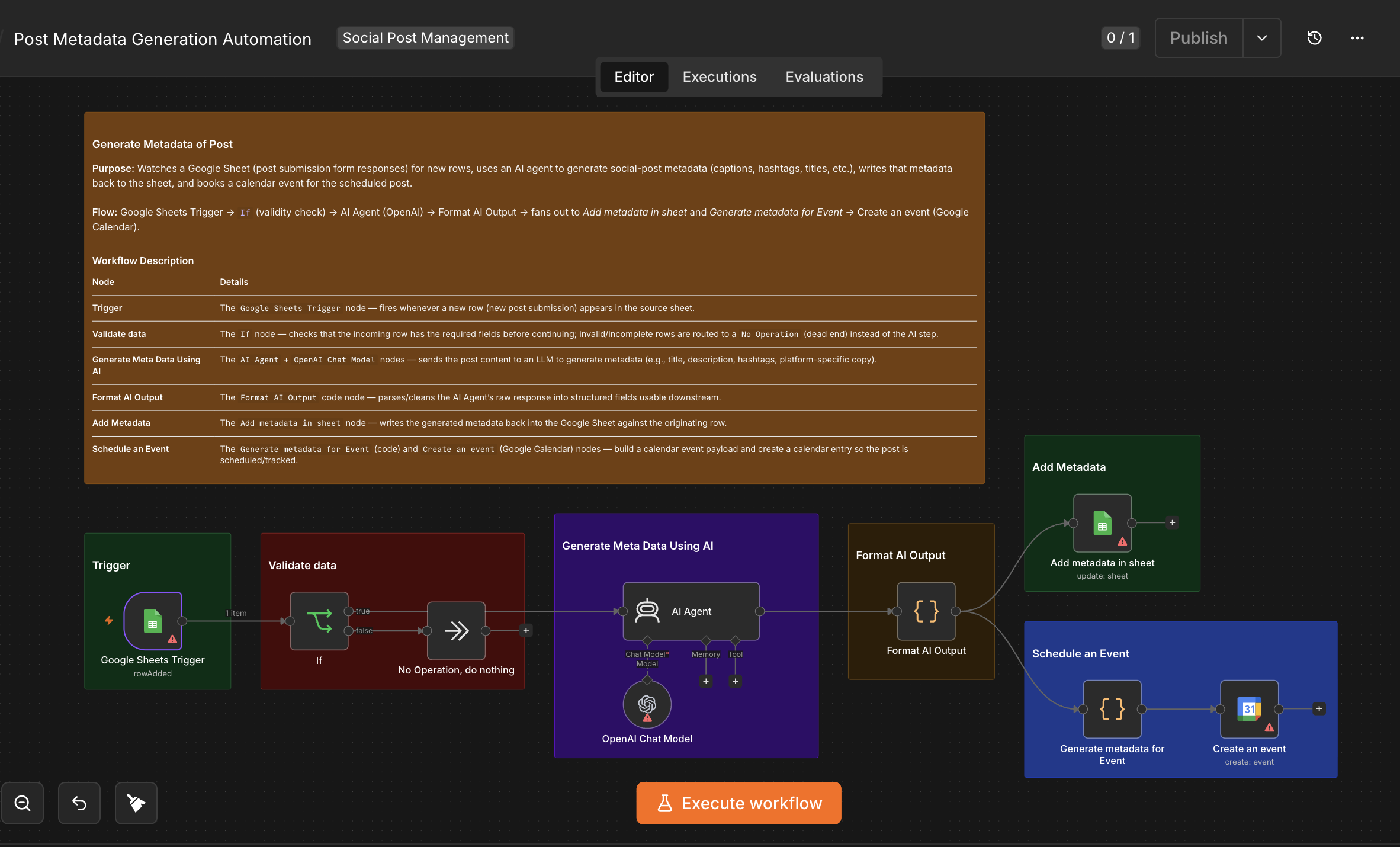
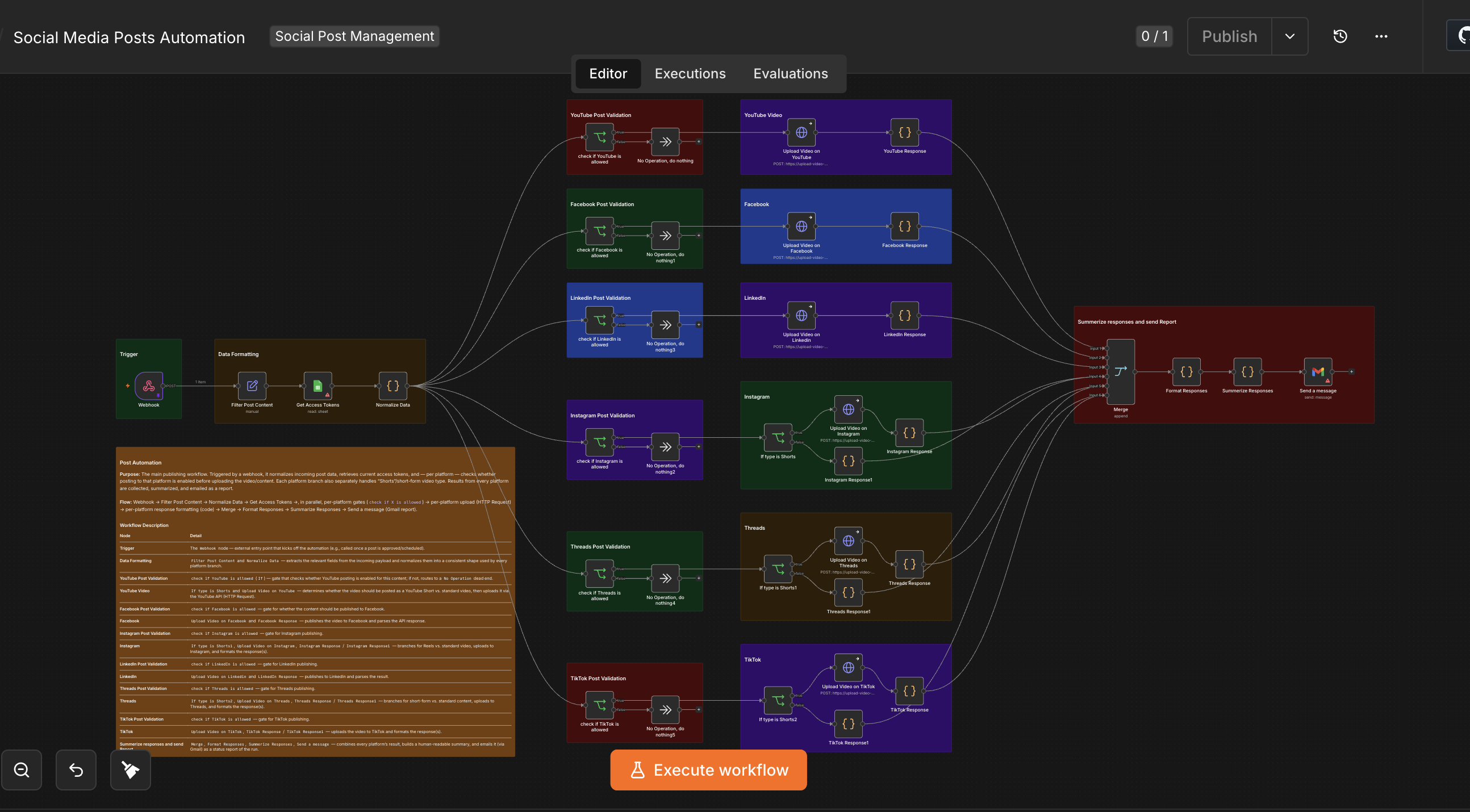
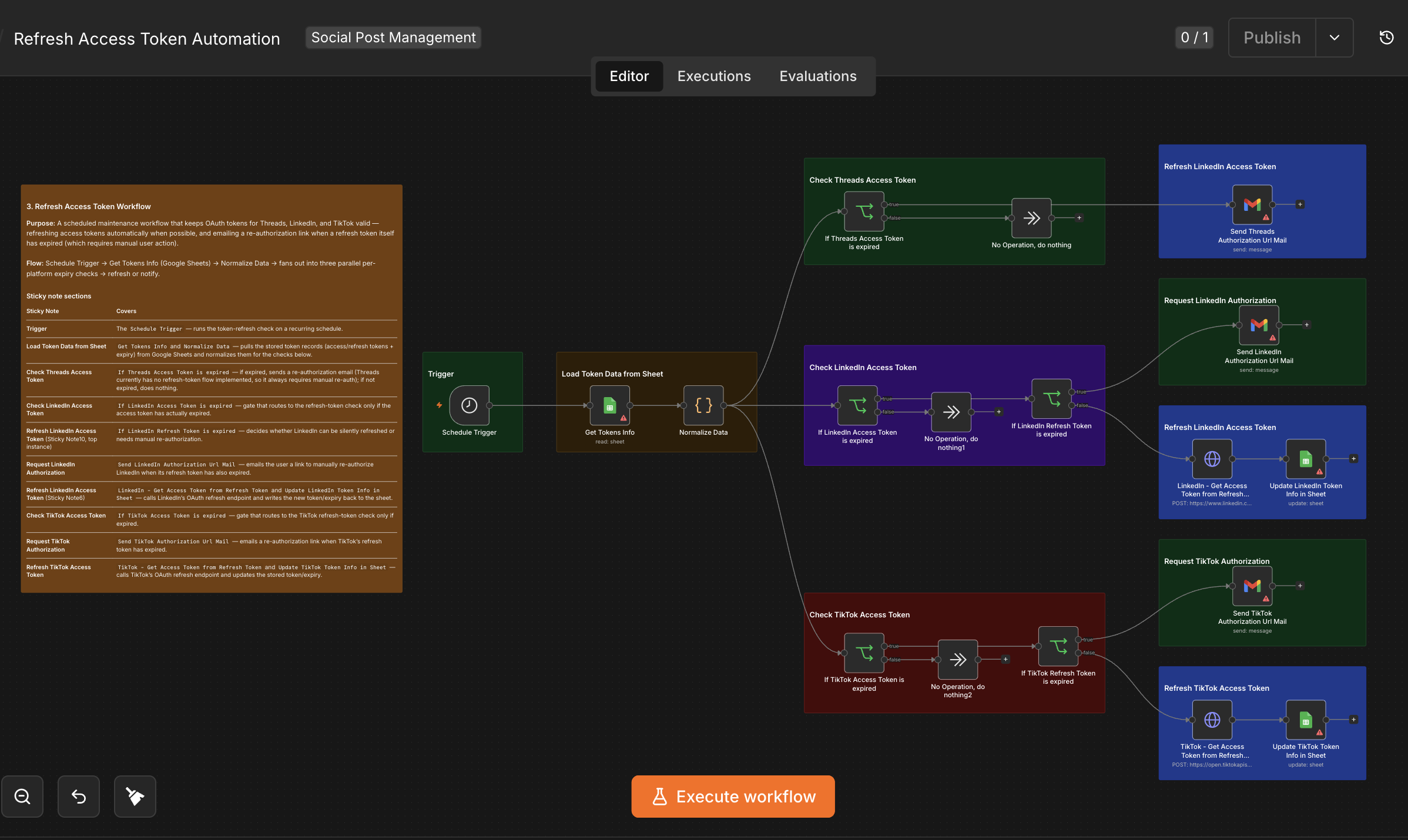
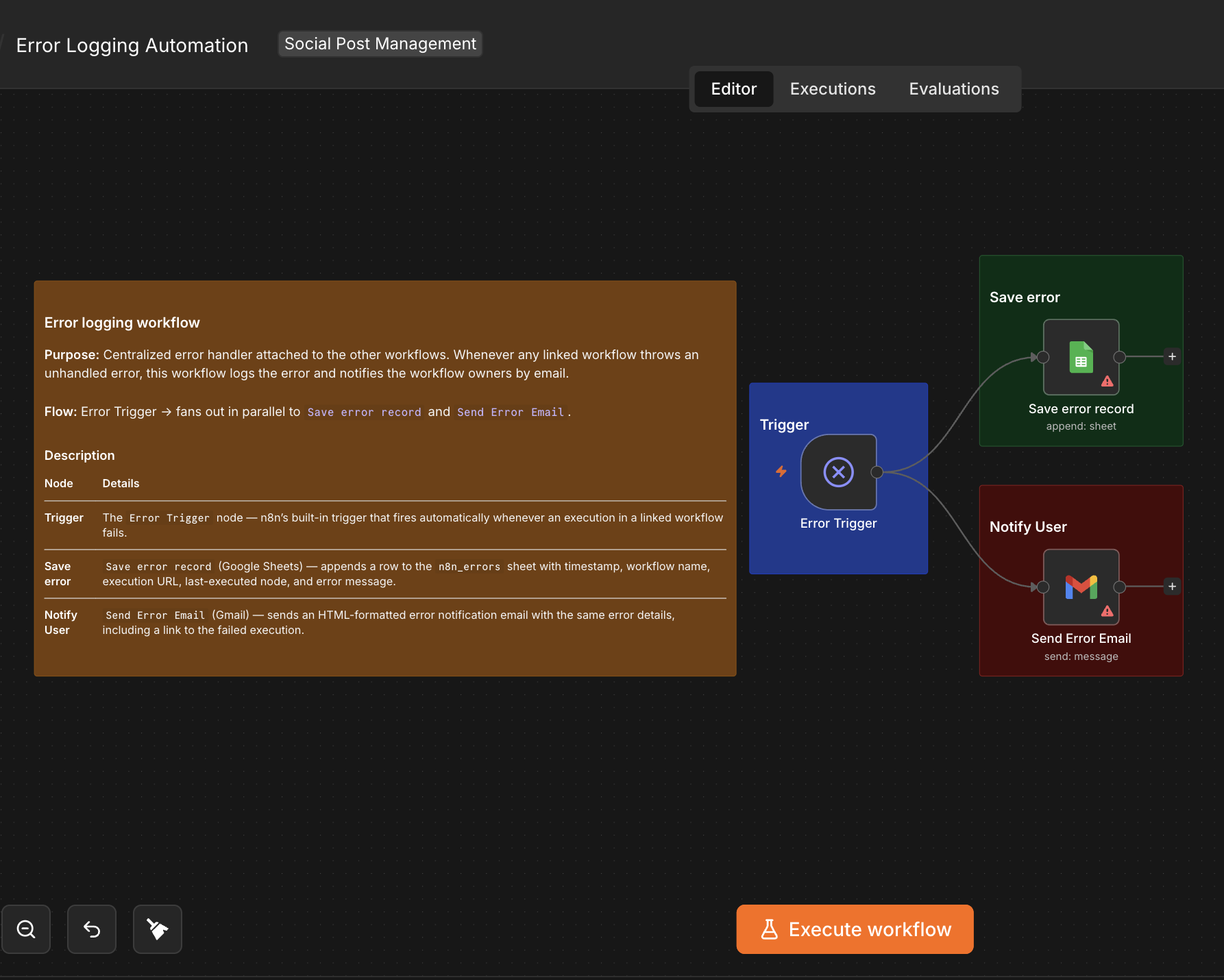
- Built the system in four layers. Google Forms and Drive form the client-facing intake — the client uploads their video/thumbnail to Drive and submits a form with the title, description, schedule, post type, and target platforms. Google Sheets is the system of record: every submission lands as a row that n8n enriches with AI-generated, platform-specific copy and a "Pending" status the client or manager reviews and approves directly in the same sheet — nothing publishes until a human signs off. Five linked n8n workflows handle orchestration: Generate Metadata of Post turns the brief into ready-to-publish captions and hashtags via an OpenAI-powered agent; a Google Apps Script trigger scans the sheet every minute for approved rows whose scheduled time has arrived and fires Post Automation over webhook, which checks per-platform permissions and content type (long-form vs. Shorts/Reels) before publishing, then merges every platform’s response into one summary emailed via Gmail; Refresh Access Token Workflow keeps all six platforms’ OAuth tokens alive on a schedule, silently renewing what it can and emailing a re-authorization link when a refresh token itself has expired; Auth Code Callbacks handles the OAuth handshake for every platform, including Threads’ required deauthorization/data-deletion endpoints and its two-step short-lived-to-long-lived token exchange; and a centralized Error Logging workflow catches any unhandled failure across the other four, logging it to a sheet and emailing an incident report. The execution layer — Google Cloud Functions — carries each platform’s actual upload logic (auth headers, payload shapes, chunked uploads, error handling) as its own independently deployable function that n8n calls over HTTP, so a single platform’s API change only means redeploying that one function, not touching the orchestration workflow.
- Impact
- Content now moves from a client’s Drive upload to a live, scheduled post across six platforms with only one manual step left — approving the AI-drafted copy in a spreadsheet the client was already using. Token expiry is handled proactively instead of breaking a scheduled post, Threads stays compliant with Meta’s platform requirements without a separate service, and every publish run ends with a single per-platform pass/fail report in the team’s inbox instead of six dashboards to check by hand.
Frequently Asked Questions
A client needed AI-drafted captions, minute-precise scheduling, and hands-off publishing across six social platforms — without a person juggling six different upload APIs, six sets of OAuth tokens, or finding out about a failed post days later.
Social Media Posting Automation was built with n8n, Google Cloud Functions, Google Apps Script, Google Forms, Google Drive, Google Sheets, Google Calendar, Gmail, OpenAI, TikTok API, LinkedIn API, Meta Graph API, YouTube Data API.
This was built as commercial/client work, so the source code isn't publicly available. Get in touch to discuss the implementation.
A system that takes a single piece of content and, without manual re-uploading, publishes it across multiple social platforms — here YouTube, Facebook, Instagram, LinkedIn, Threads, and TikTok — by orchestrating each platform’s API through n8n, with platform-specific upload logic executed via serverless functions.
Google Cloud Functions isolate each platform’s upload logic — authentication, payload formatting, chunked uploads, error handling — into its own independently deployable unit, while n8n only handles orchestration. A platform API change means redeploying that one Cloud Function, not touching the orchestration workflow.
A scheduled workflow checks every platform’s stored token expiry. If the access token has expired but the refresh token is still valid, it’s renewed automatically via the platform’s refresh endpoint; if the refresh token itself has expired, the system emails the user a re-authorization link instead, since that step needs manual consent.
Threads issues a short-lived access token first, which has to be exchanged for a long-lived token in a second call — unlike the single-step exchange the other platforms use. Meta also requires dedicated deauthorization and data-deletion callback endpoints as a condition of API access.
Each platform’s API response is parsed and formatted individually, then merged into one summary emailed after every publish run, showing a per-platform pass/fail. A separate centralized error-logging workflow additionally catches and alerts on any unhandled failure anywhere in the stack.
The publishing workflow checks the content’s type — short-form vs. standard — before the platform-specific upload step and branches accordingly, routing short-form content through each platform’s short-video format (YouTube Shorts, Instagram Reels, TikTok, Threads short video) and standard content through the regular upload path.
It keeps token data transparent and easy to audit without needing database access, and integrates natively with n8n’s Google Sheets nodes for both reading current tokens before a publish run and writing updated tokens after a refresh — a practical fit for this scale of automation.
Before each platform’s upload branch, the Post Automation workflow runs an explicit "is this platform allowed for this post" check against the row’s own configuration, so only the platforms a piece of content was actually flagged for get called — preventing accidental cross-posting.
The client uploads their video/thumbnail to Drive separately, then submits a Form with the links, title, description, schedule, post type, and target platforms. Each submission creates a new Google Sheets row automatically, which becomes the trigger for AI content generation and, later, the publish workflow.
It ensures AI-generated captions and descriptions are reviewed — and edited if needed — for brand tone, accuracy, and client intent before they go live on any platform, since publishing unreviewed AI content risks off-brand or incorrect posts on channels where corrections after the fact are difficult.
A time-driven trigger runs every minute, scanning the Google Sheet for rows marked approved whose scheduled date and time has arrived, then calls the Post Automation n8n workflow by webhook with that row’s data — turning the spreadsheet into a lightweight, minute-precision job scheduler.
n8n’s built-in schedule triggers run on fixed, predefined intervals rather than reacting to an ever-changing list of client-submitted publish times stored in a spreadsheet. An Apps Script trigger bound to that sheet checks every row’s scheduled time each minute and fires the publish workflow only when a specific row is due, without pre-registering each schedule inside n8n.
Available for work
Got a project like this
in mind?
Let's talk about what you're building and how I can help ship it.